
Professionals rarely become more organized by adding another app to an already crowded workspace. A durable productivity system assigns a clear place to commitments, time, active work, and reference information—then makes reviewing those places part of the routine.
A task manager, calendar, project board, and notes app can all be useful, but they solve different problems. Confusion begins when one tool is expected to hold every idea, deadline, document, meeting, and long-term responsibility.
The useful distinction: a productivity system is the set of rules that determines where information goes and how work is chosen. Software is only the container used to implement those rules.
The Four Layers of a Professional System
The most practical systems tend to specialize in one or two of these layers. That is why professionals often combine compatible methods instead of forcing one framework to manage everything.
Four Productivity Systems Worth Understanding
Getting Things Done
A system for handling commitments and next actionsGetting Things Done, commonly called GTD, organizes work through five stages: capture, clarify, organize, reflect, and engage. The essential habit is moving open commitments out of memory and into a trusted system, then deciding what each item actually means.
A vague entry such as “website” is not yet a usable task. Clarifying it might produce a project called “Publish redesigned website” and a next action such as “Request the revised homepage copy from the editor.”
Best for: overloaded inboxes and unclear commitmentsTime Blocking
A calendar-based system for protecting attentionTime blocking assigns categories of work to specific portions of the day. Instead of repeatedly asking what to do next, the professional creates a realistic plan using the calendar, task lists, and current priorities.
The schedule is not meant to predict the day perfectly. Cal Newport’s description of the method includes leaving room to revise blocks when unexpected work appears. The value comes from giving important work a place rather than hoping it fits around meetings and messages.
Best for: professionals whose priority work keeps getting postponedKanban
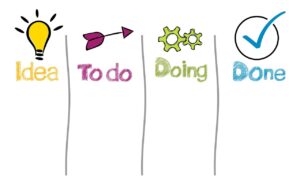
A visual system for controlling work in progressKanban represents work as cards moving through defined stages such as Backlog, Ready, In Progress, Review, and Done. The board makes ownership, delays, and overloaded stages easier to see.
A central practice is limiting work in progress. Rather than continuously starting new tasks, the team sets boundaries on how many items may remain active in a stage. This helps reveal bottlenecks and encourages finishing existing work before accepting more.
Best for: shared projects, recurring requests, and visible handoffsPARA
A structure for organizing digital informationPARA organizes digital information into four categories: Projects, Areas, Resources, and Archives.
- Projects: active efforts with a specific outcome.
- Areas: ongoing responsibilities without a fixed end date.
- Resources: useful subjects and reference material.
- Archives: inactive material retained for possible future use.
The method is organized around actionability rather than broad subjects. A file connected to an active client launch belongs near that project, even if it could also be categorized as marketing, design, or sales.
Best for: scattered notes, documents, research, and cloud foldersSide-by-Side Comparison
| System | Main question answered | Strongest use | Common mistake |
|---|---|---|---|
| GTD | What does this commitment mean, and what is the next action? | Personal task and commitment management | Capturing everything but rarely clarifying or reviewing it |
| Time Blocking | When will this work receive focused time? | Daily planning and attention protection | Scheduling every minute without room for delays or changes |
| Kanban | Where is the work, and what is preventing it from moving? | Team workflow and work-in-progress control | Creating a board that displays overload but does not limit it |
| PARA | Where should this information live so it supports current work? | Notes, files, resources, and digital knowledge | Building too many folders and turning the system into another project |
A simple professional combination
Use GTD principles to clarify commitments, time blocking to protect focused work, a Kanban board to manage shared delivery, and PARA to organize the supporting documents. Each system has one job, reducing the temptation to duplicate every item across every tool.
Which System Should You Start With?
Productivity System Matcher
Choose the problem creating the most friction in your work. The result suggests a reasonable starting point rather than a complete productivity overhaul.
A Low-Risk Way to Begin
A system should reduce decisions, not create a second job. Avoid migrating every old file, installing several applications, or copying hundreds of tasks before confirming that the underlying rules work for your responsibilities.
Also keep sensitive business information inside approved services. Before moving client files, employee records, contracts, or internal documents into a new productivity platform, review its permissions, sharing controls, retention practices, export options, and organizational requirements.
Official References Reviewed
The following official or original sources were reviewed when preparing the descriptions above. Product features and published guidance may change, so current information should be confirmed directly with the source.
Use Fewer Rules, More Consistently
The strongest productivity system is not necessarily the most detailed one. It is the system that helps you capture commitments, protect time, finish active work, and retrieve supporting information without constant rebuilding.
Choose the layer causing the most friction, test one method for a week, and add another system only when it solves a clearly different problem.

The SHP Digital Atelier Editorial Team publishes practical and accessible educational content about online tools, SaaS platforms, workflow automation, file optimization, document management, productivity systems, and digital operations. Our guides focus on clear instructions, realistic limitations, responsible comparisons, and information readers should verify before choosing or implementing a digital product or service.